Subscriptions
Subscriptions bill a customer again and again on a fixed cycle: monthly hosting, an annual support contract, a weekly delivery, a retainer. NaliSuite issues each renewal invoice by itself, emails it, chases it when it is late, and works out the difference when a customer moves to a bigger or smaller plan. Hosting companies can also create, suspend and remove cPanel accounts automatically. You find this under Finance → Subscriptions and Finance → Recurring revenue; the settings are in Settings → Preferences → Subscriptions.
What you need before you start
| You want to | Permission needed |
|---|---|
| See subscriptions and recurring revenue | subscriptions.view |
| Create, start, change, pause, cancel subscriptions; import from WHMCS; manage hosting | subscriptions.manage |
| Export | subscriptions.export |
The Invoicing app must be on, because every renewal is an invoice.
Plans are recurring products
A "plan" is simply a product with a billing cycle.
- Open Sales → Products and create (or open) a service, for example "Cloud VPS 6 (monthly)".
- In Pricing, set Billed every (marker 1) to Week, Month, Quarter or Year, and the Sale price (marker 2) per cycle.
- Save.
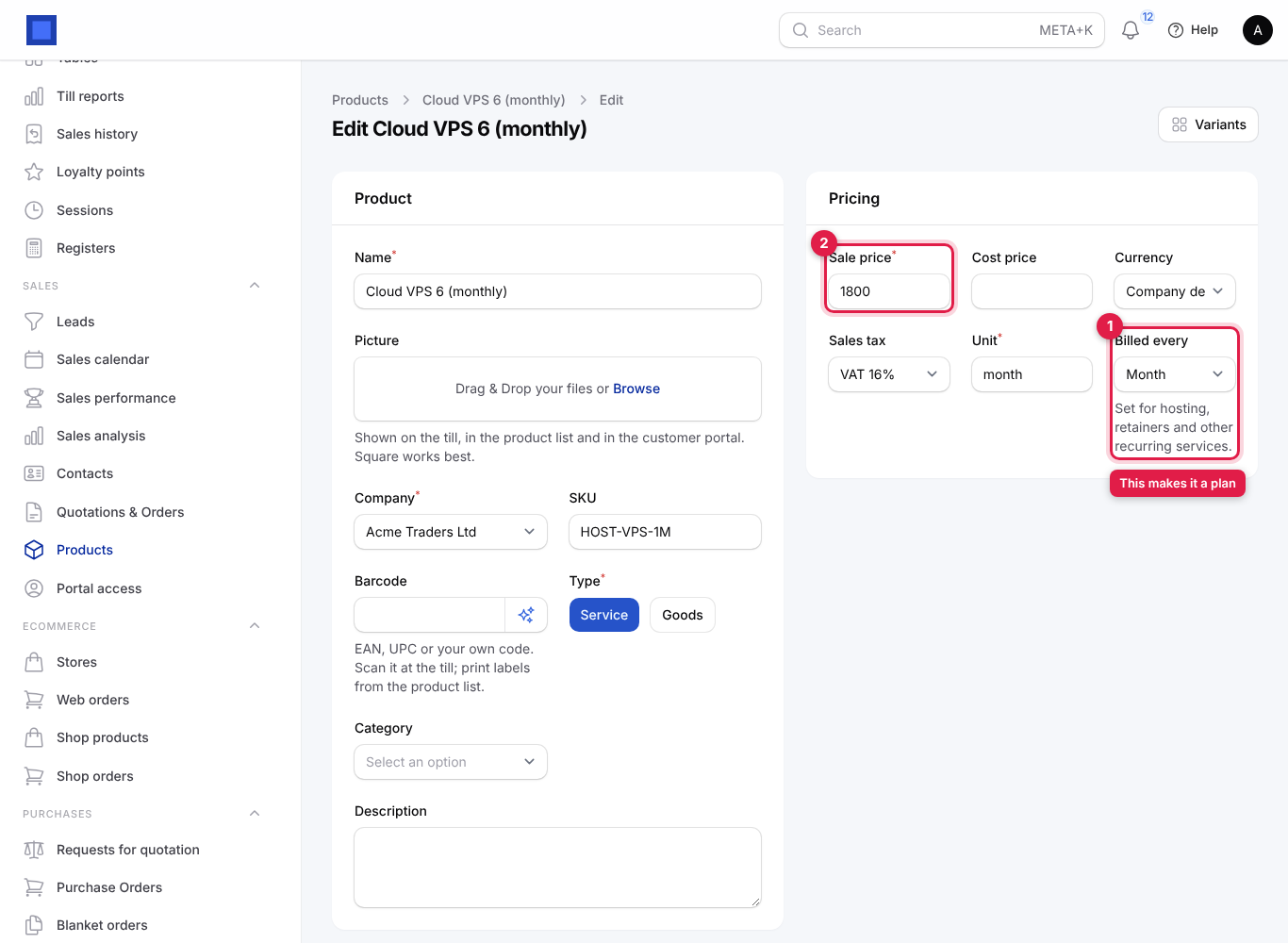
Recurring products are listed first when you add lines to a subscription, are the choices in Change plan, and are what customers may switch between in the portal (only plans with the same cycle). See Products and pricing.
How a subscription moves through its life
| Status | Meaning | What moves it |
|---|---|---|
| Draft | Set up, not started. No number, nothing billed. Everything editable; can be deleted. | Start. |
| Trial | Started with a free period (Free until in the future). Not billed until the trial ends. | The first billing run after the trial. |
| Active | Running and billed each cycle. | Billing continues; Pause, Cancel, or an unpaid renewal. |
| Past due | A renewal invoice is overdue. Hosting can be suspended. | Back to Active at the next renewal billing, and hosting is unsuspended. |
| Paused | Billing stopped for now. | Resume. |
| Cancelled | Ended. | Final. |
When a subscription is cancelled "at the end of the paid period", it stays active with Ends at period end until that date, then ends at the next billing run.
Find your way around the subscription list
- In the menu, open Finance → Subscriptions.
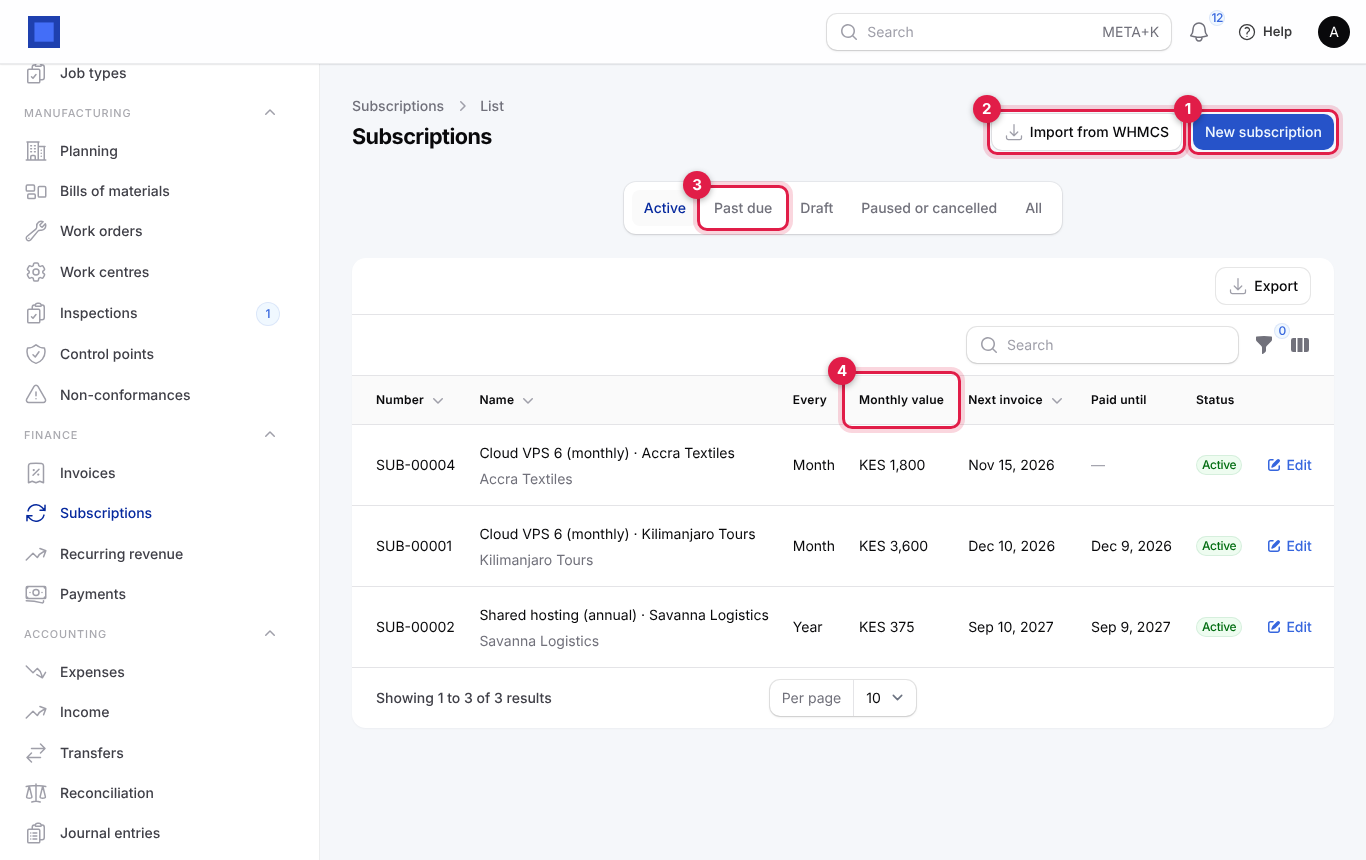
| Item | What it does |
|---|---|
| New subscription (marker 1) | Opens a new draft subscription. |
| Import from WHMCS (marker 2) | Imports customers, plans and services from a WHMCS export. See Move from WHMCS. |
| Tabs Active (default: active, trial and past due), Past due (marker 3), Draft, Paused or cancelled, All | |
| Monthly value (marker 4) | What the subscription is worth per month, whatever its cycle (an annual KES 12,000 plan shows KES 1,000). |
| Filter | Status, Customer. |
Other columns: Number (SUB-00001), Name with the customer underneath, Every (the cycle), Next invoice date, Paid until and Status. The list is sorted by next invoice date, so the next renewals are at the top.
Create and start a subscription
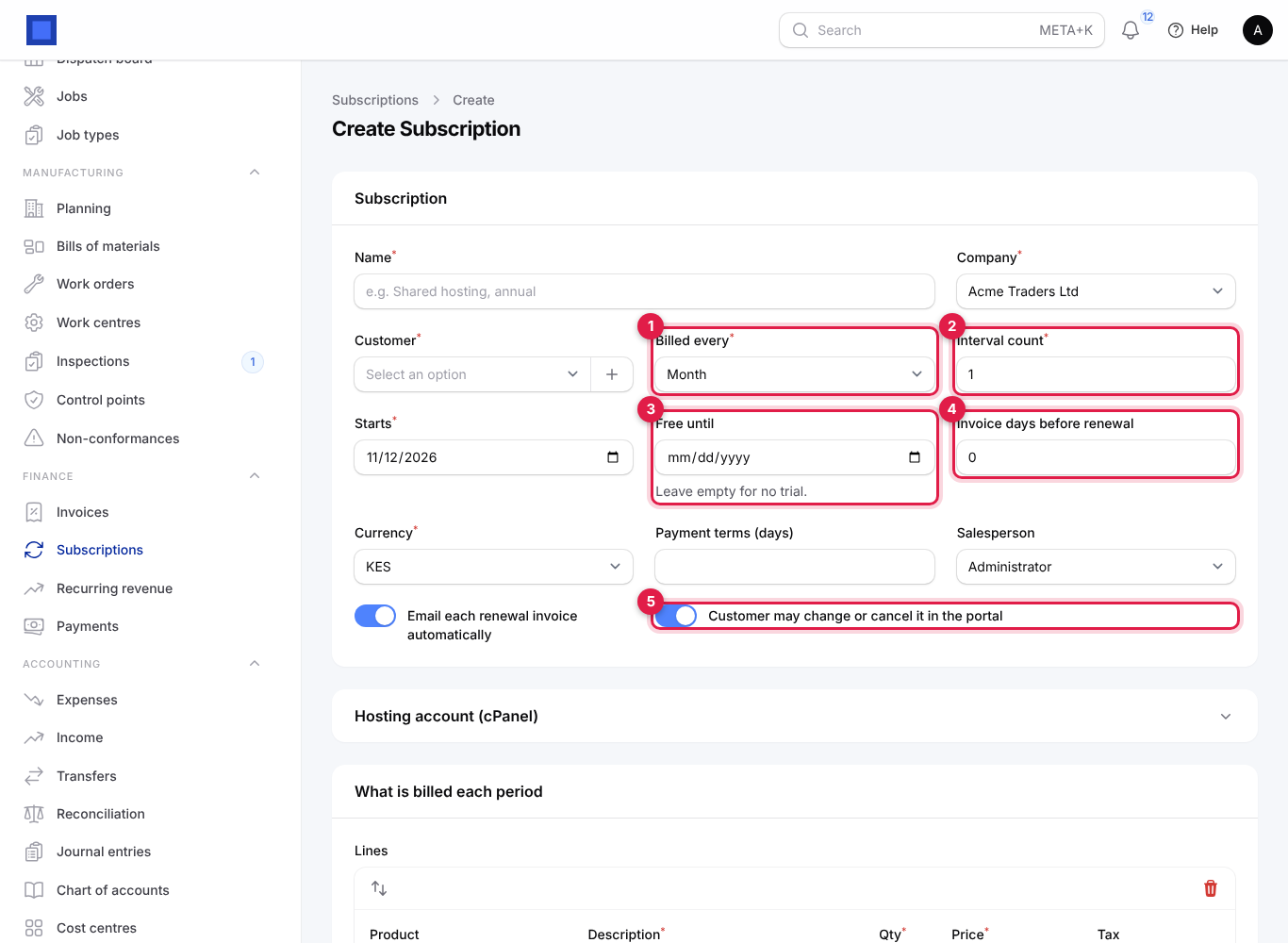
- Open Finance → Subscriptions and click New subscription.
- Type a Name, for example "Shared hosting, annual · Savanna Logistics", and pick the Customer (click + to add a new one).
- Choose Billed every (marker 1) and the Interval count (marker 2): Month and 1 for monthly, Month and 6 for every six months.
- Set Starts (the first day of the first period). For a free trial, set Free until (marker 3).
- Set Invoice days before renewal (marker 4) if customers should get the invoice in advance, for example 7.
- Keep or switch off Email each renewal invoice automatically and Customer may change or cancel it in the portal (marker 5).
- Under What is billed each period, pick the Product (marker 2) and check the Qty, Price and Tax. Add more lines with Add to lines (marker 3), for example a plan plus an add-on. For hosting, open Hosting account (cPanel) (marker 1).
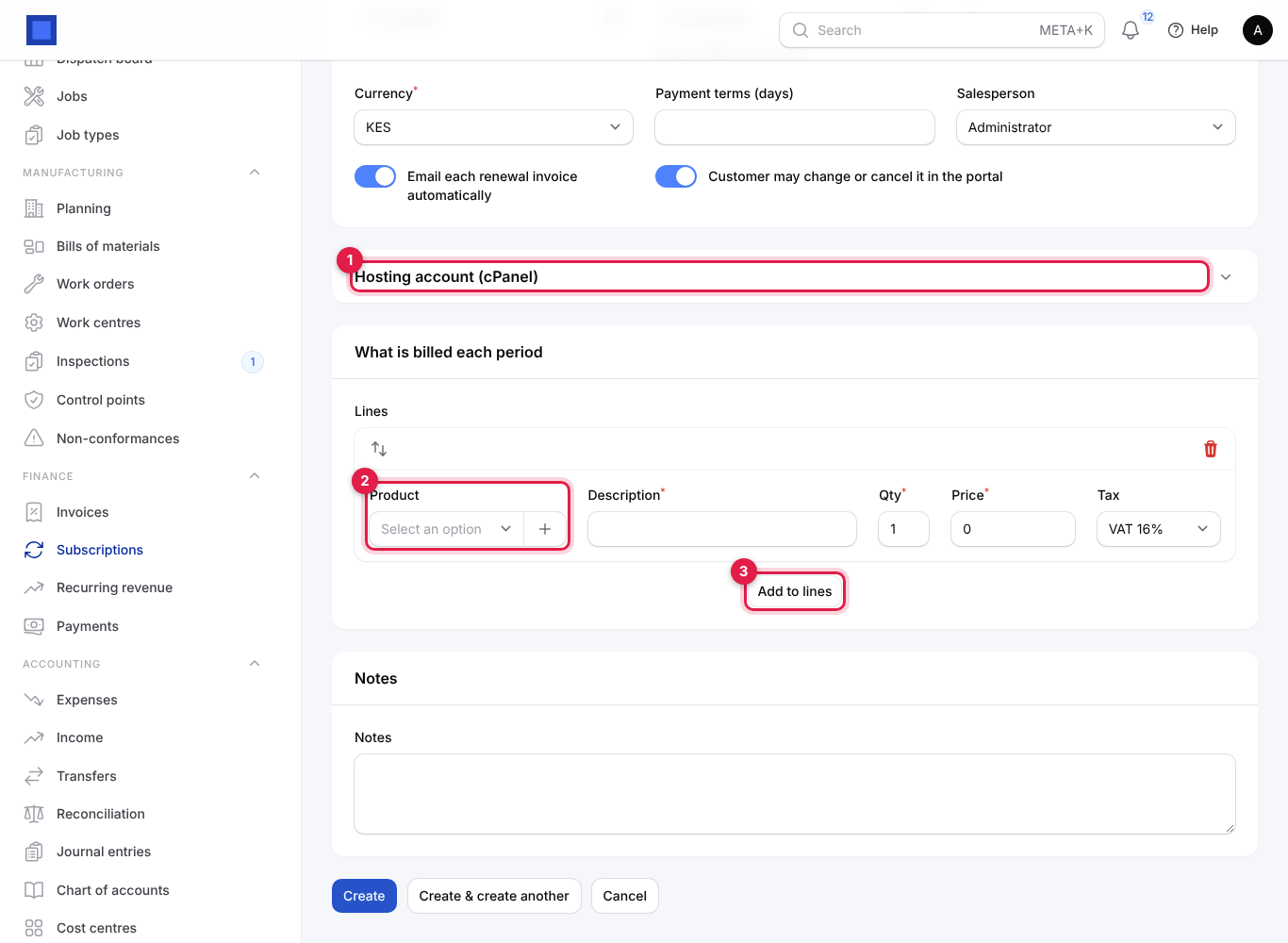
- Click Create. The subscription is saved as a Draft.
- Check it, then click Start at the top and confirm. It gets its number, becomes Active (or Trial), and its first invoice is issued at the next nightly billing run, or straight away if the start date has passed.
Every field on the subscription
| Field | What to enter |
|---|---|
| Name (required) | What the customer is subscribed to. Appears on renewal invoices. |
| Company (required) | Locked once started. |
| Customer (required) | Locked once started. |
| Billed every (required) | Week, Month, Quarter or Year. Locked once started (use Change plan to move between plans). |
| Interval count (required) | 1 to 36 cycles per period. Locked once started. |
| Starts (required) | First day of the first period. Locked once started. |
| Free until | Last day of a free trial. Empty for no trial. Locked once started. |
| Invoice days before renewal | Issue each renewal invoice this many days before the new period starts (0 to 60). The default is in Preferences → Subscriptions. |
| Currency (required) | Locked once started. |
| Payment terms (days) | How long the customer has to pay each renewal. Sets the due date of renewal invoices. |
| Salesperson | For commission and reports. |
| Email each renewal invoice automatically | Each renewal invoice is emailed to the customer as soon as it is issued (also needs the Preferences switch on and an email on the customer). |
| Customer may change or cancel it in the portal | Allows self-service upgrades, downgrades and cancellation for this subscription (also needs the Preferences switches). |
| Hosting account (cPanel): Domain, cPanel package, cPanel username | See Provision cPanel hosting automatically. |
| Lines: Product, Description (required), Qty (required), Price (required), Tax | What is invoiced every period. |
| Notes | Internal. |
How renewals are billed
Every night at 02:30 the billing run looks at every active, trial and past-due subscription whose Next invoice date has arrived. For each one it:
- Creates an invoice for the coming period, with the subscription's lines, the period dates in the notes ("Shared hosting · 1 Dec 2026 to 30 Nov 2027") and the subscription number as the customer reference.
- Issues it straight away (number, ledger posting, e-invoicing as for any invoice).
- Emails it to the customer when automatic sending is on.
- Moves Paid until and Next invoice forward by one period.
To bill early, open the subscription and click Invoice now: the next period's invoice is issued immediately and opens. Renewal invoices are ordinary invoices: customers pay them with the pay link or in the portal, and you record payments as usual. See Invoices and payments.
When a renewal invoice is overdue, the daily reminder run emails the customer and marks the subscription Past due; with Suspend hosting when a renewal goes past due on, its cPanel account is suspended too. It returns to Active (and hosting is unsuspended) at its next renewal billing.
Manage a running subscription
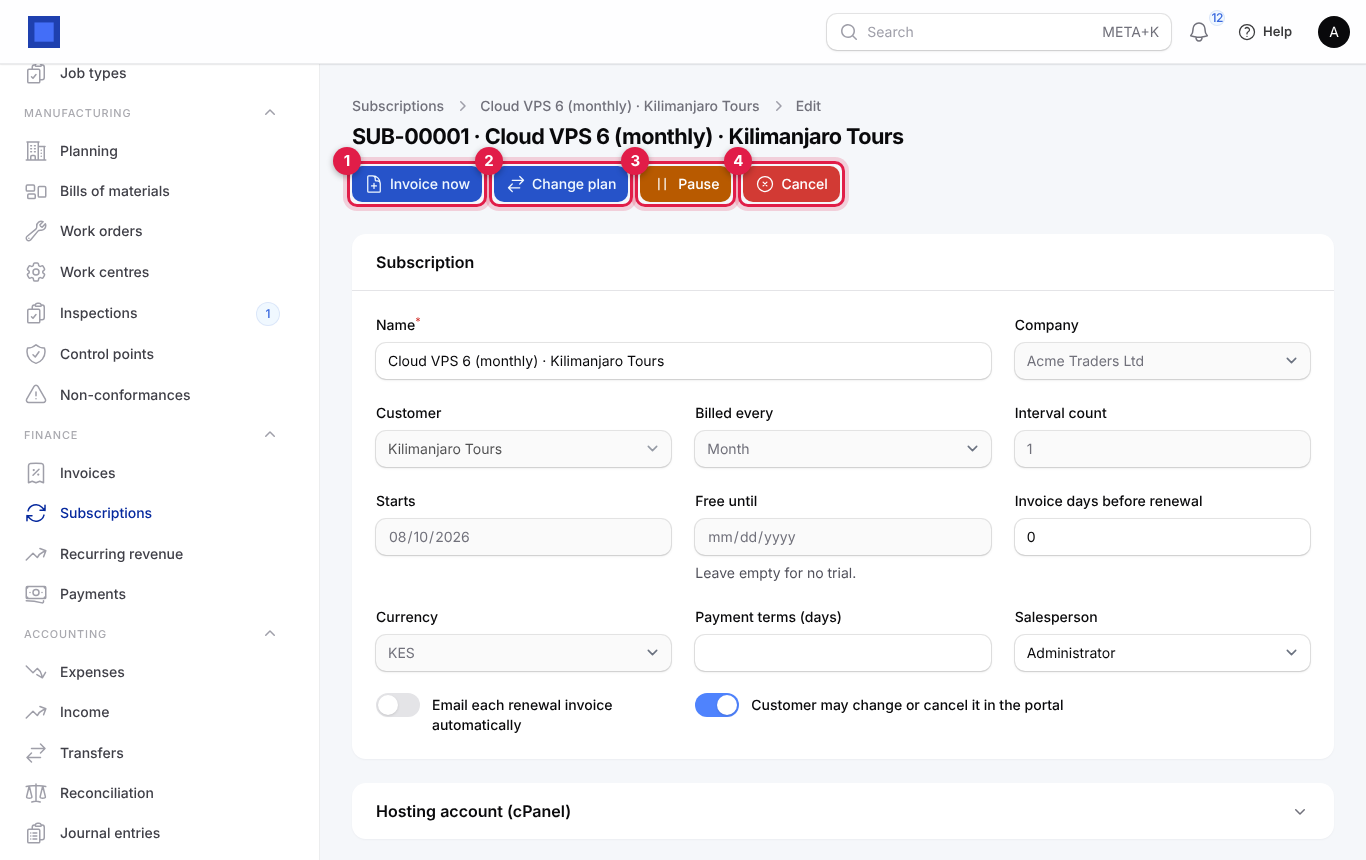
Open the subscription. The header shows what you can do:
| Action | When it shows | What it does |
|---|---|---|
| Start | Draft | Starts it; see above. |
| Invoice now (marker 1) | Active, trial or past due | Issues the next period's invoice now. |
| Change plan (marker 2) | Active, trial or past due | Moves it to another recurring product, with proration. |
| History | After any change | Shows every plan change, cancellation and reactivation with who did it (staff, customer or import) and the monthly value before and after. |
| Provision hosting / Suspend hosting / Unsuspend hosting | Hosting subscriptions with WHM set up | Acts on the cPanel account by hand. |
| Pause (marker 3) | Active, trial or past due | Stops billing. |
| Resume | Paused | Starts billing again from today. |
| Cancel (marker 4) | Active, trial, past due or paused | Ends it, by default at the end of the paid period. |
| Delete | Draft | Deletes the draft. |
Change plan with proration
- Click Change plan.
- Choose the New plan (marker 1). Each option shows its price and cycle.
- Check the Quantity (marker 2).
- Keep Prorate the rest of this period (marker 3) on to charge or credit the difference now. Switch it off to change only from the next renewal.
- Click Submit.
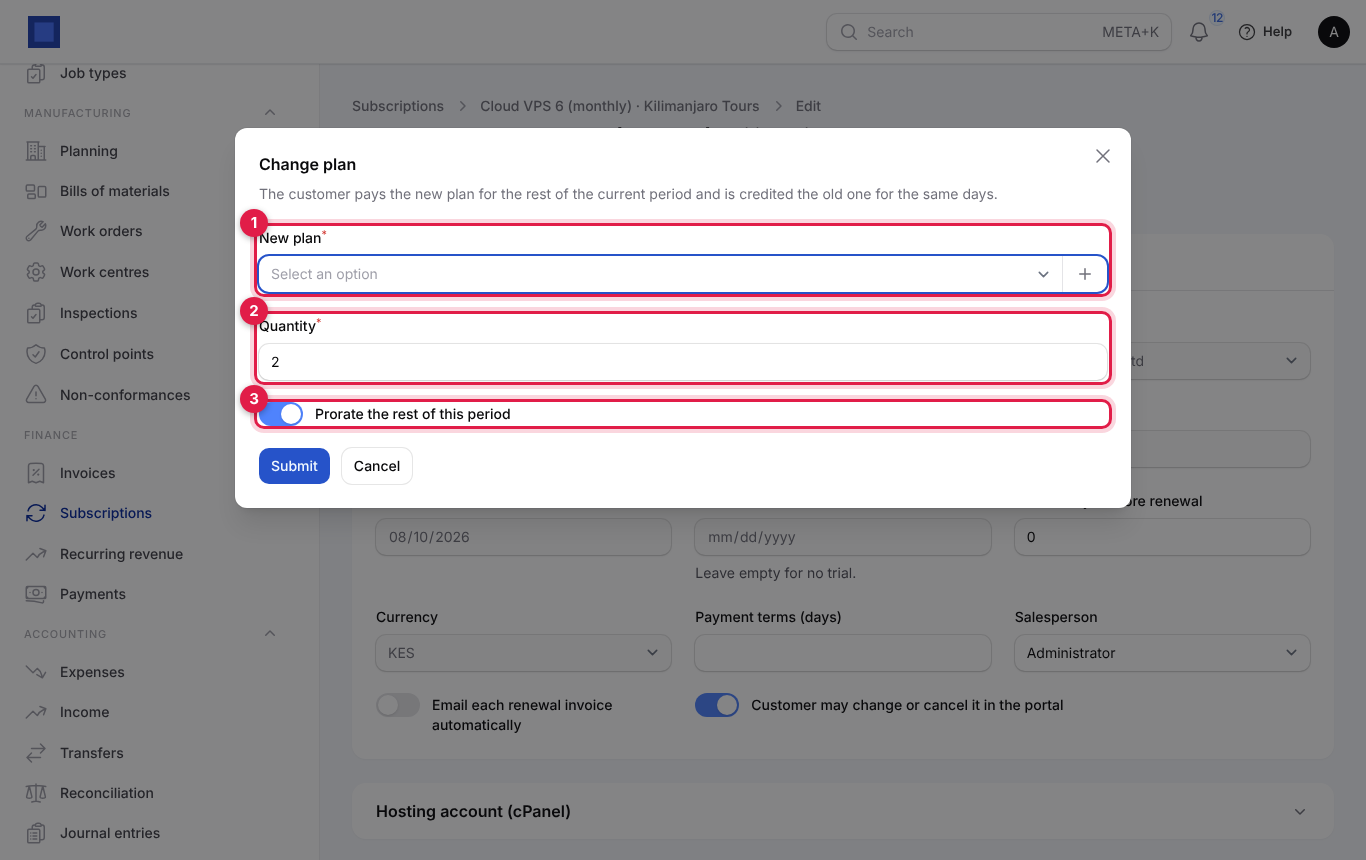
With proration, the customer pays the new plan for the days left in the current period and is credited the old plan for the same days:
- If the new plan costs more, an invoice for the difference is issued ("Plan changed; invoice for 1,250.00 issued").
- If it costs less, a credit note is issued ("Plan changed; credit note for … issued").
- If the period has not started yet, nothing is charged.
Example: a customer on a KES 1,800 monthly plan moves to a KES 3,000 plan halfway through the month. They are invoiced about KES 600 (half of 3,000 less half of 1,800). From the next renewal they pay KES 3,000.
The subscription's lines and name follow the new plan, the change is logged in History, and with cPanel hosting the account is moved to the package named like the new product.
Cancel a subscription
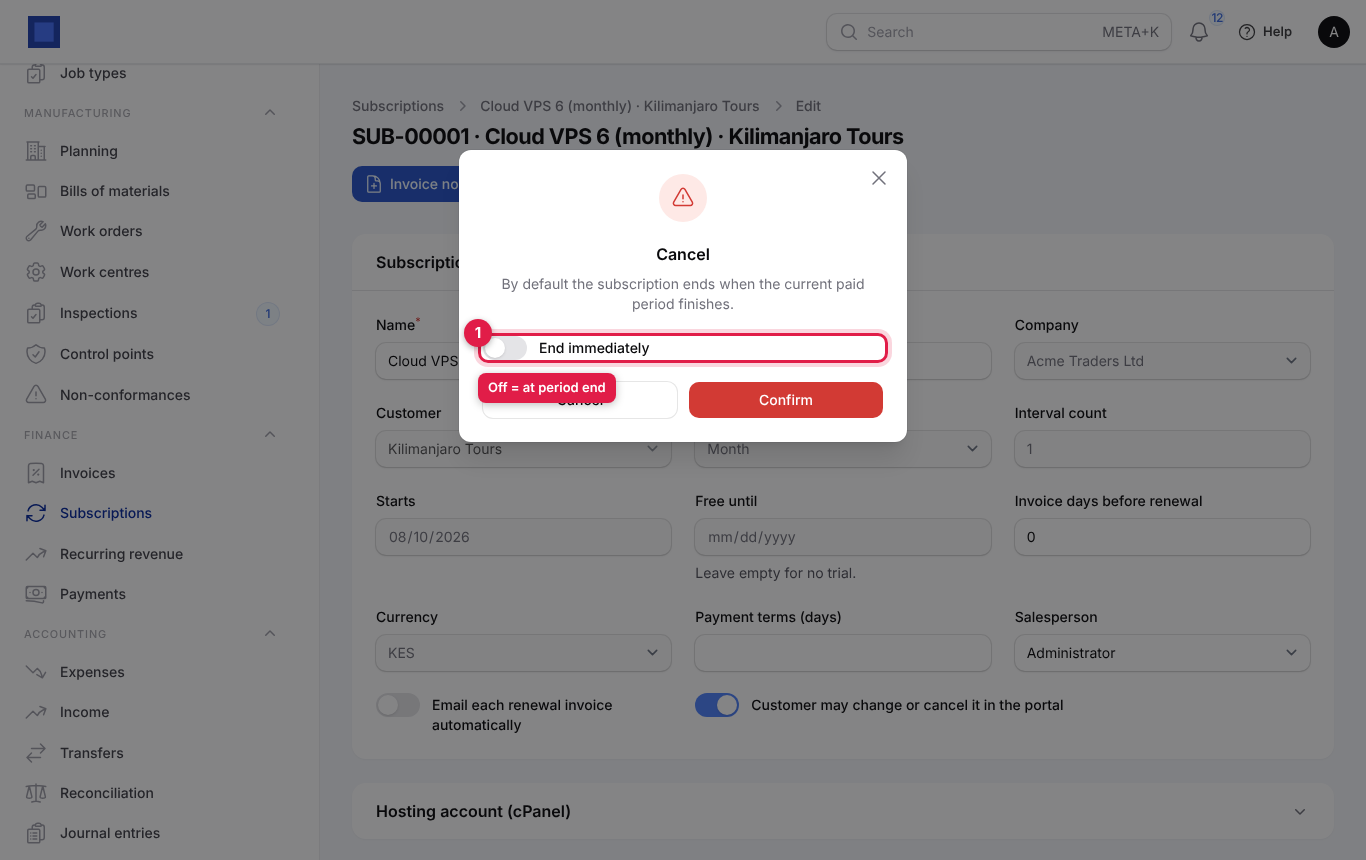
- Click Cancel.
- Leave End immediately (marker 1) off to end it when the paid period finishes (the usual choice: the customer keeps what they paid for). Switch it on to end it today.
- Click Confirm.
With hosting, the cPanel account is suspended when the subscription ends, or removed if Remove the cPanel account when a hosting subscription ends is on. Cancelling does not credit anything automatically; issue a credit note from the last invoice if you are refunding.
Pause and resume
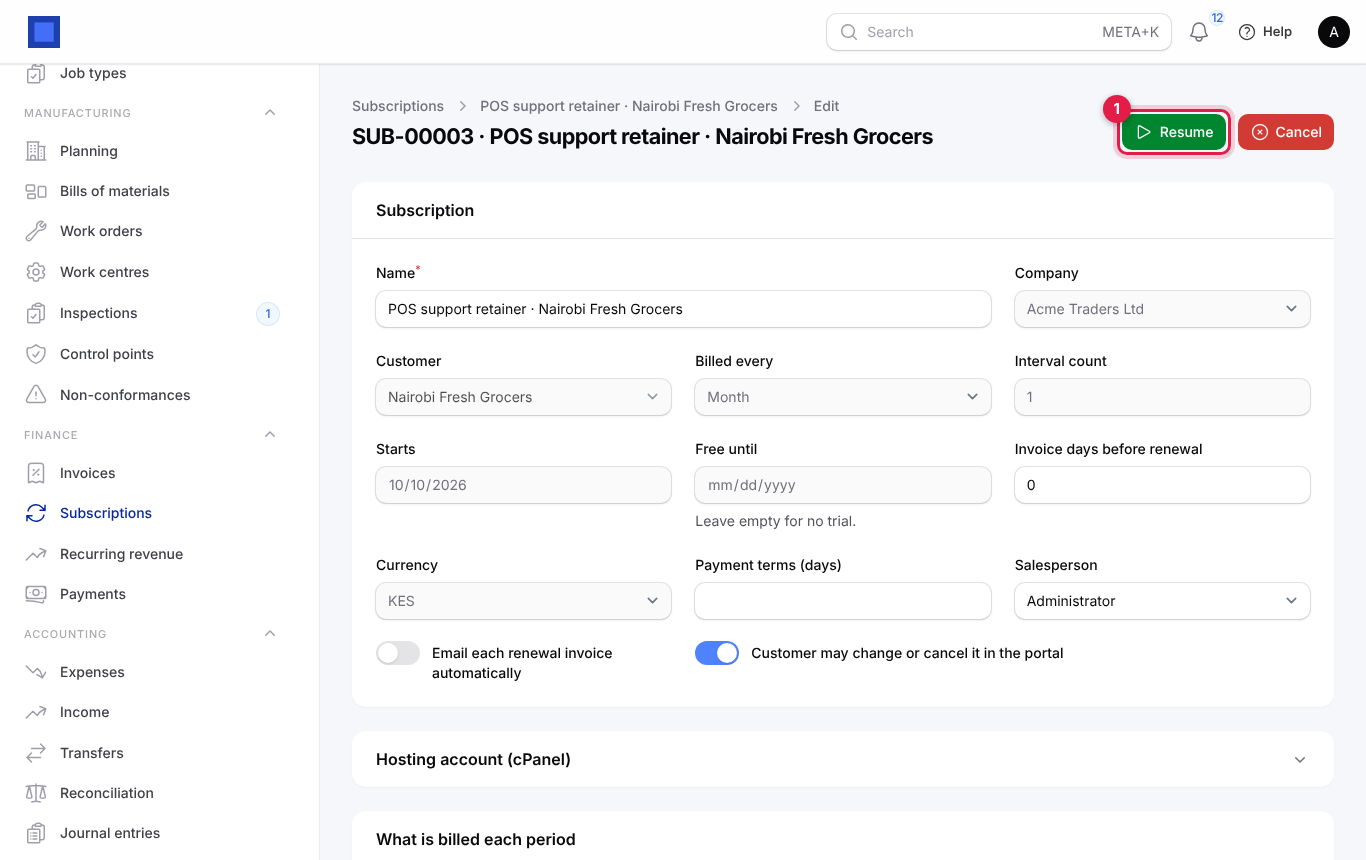
Pause stops billing while, for example, a client's shop is closed for renovation. The subscription moves to the Paused or cancelled tab. Open it and click Resume (marker 1) to restart billing from today.
What customers can do in the portal
When the portal shows subscriptions (Preferences → Customer portal → Show subscriptions to customers) and the subscription allows self-service, customers see their subscriptions in the portal and can:
- Change plan: pick another recurring plan billed on the same cycle and click Switch. The difference for the rest of the period is invoiced or credited, exactly as above. Needs Preferences → Subscriptions → Customers may switch plans in the portal.
- Cancel subscription: always at the end of the paid period. It then shows Ends at period end with a Keep my subscription button to undo it until that date. Needs Customers may cancel in the portal.
Your team gets a "Subscription changes" notification for each change, and it is logged in History. See Customer and vendor portal.
Provision cPanel hosting automatically
If you sell web hosting on a cPanel/WHM server, NaliSuite can run the accounts for you.
- In WHM, go to Development → Manage API Tokens and create a token.
- In NaliSuite, open Settings → Preferences → Subscriptions and fill in cPanel / WHM: WHM URL (for example https://server.example.com:2087), WHM user (usually root) and API token. Save.
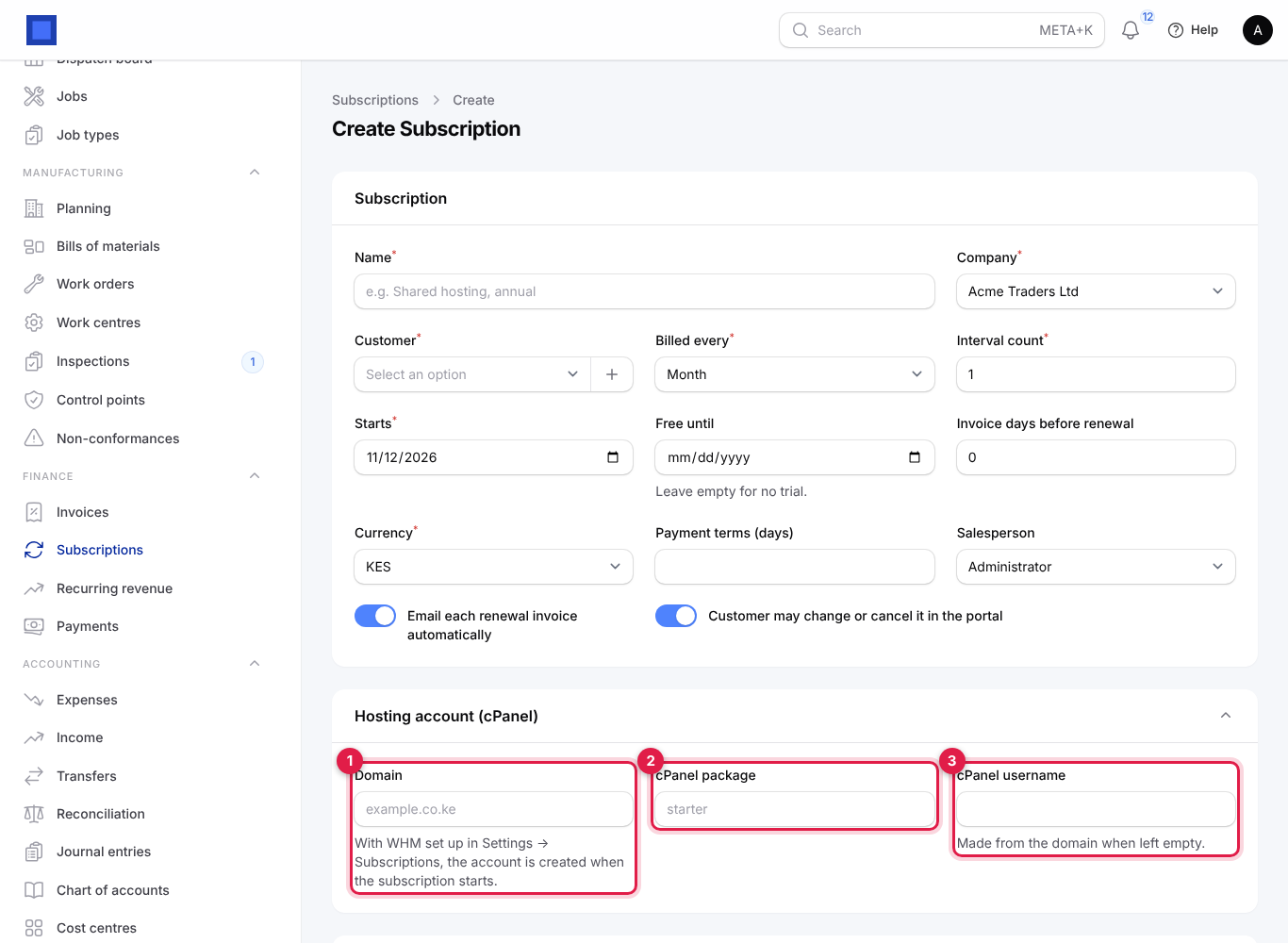
- On each hosting subscription, open Hosting account (cPanel) and fill in:
| Field | What to enter |
|---|---|
| Domain (marker 1) | The customer's domain, for example example.co.ke. Filling it makes this a hosting subscription. |
| cPanel package (marker 2) | The WHM package name, for example "starter". |
| cPanel username (marker 3) | Leave empty to have one made from the domain. Afterwards it shows the account Status and the last error, if any. |
What happens automatically:
| When | On the server |
|---|---|
| The subscription starts | The cPanel account is created. |
| A renewal goes past due (with Suspend hosting when a renewal goes past due on) | The account is suspended. |
| It becomes active again | The account is unsuspended. |
| The plan changes | The account moves to the package named like the new plan. |
| The subscription ends | The account is suspended, or removed when Remove the cPanel account when a hosting subscription ends is on. |
Use Provision hosting, Suspend hosting and Unsuspend hosting on the subscription to do the same by hand, for example to retry after an error.
Move from WHMCS
- In WHMCS, export Products/Services as CSV with a header row. The columns used are: id, firstname, lastname, email, companyname, product name, domain, billingcycle, amount, nextduedate, regdate, status, username and packagename.
- In NaliSuite, open Finance → Subscriptions and click Import from WHMCS.
- Choose the Company and upload the file in Products/Services CSV (marker 1). Click Submit.
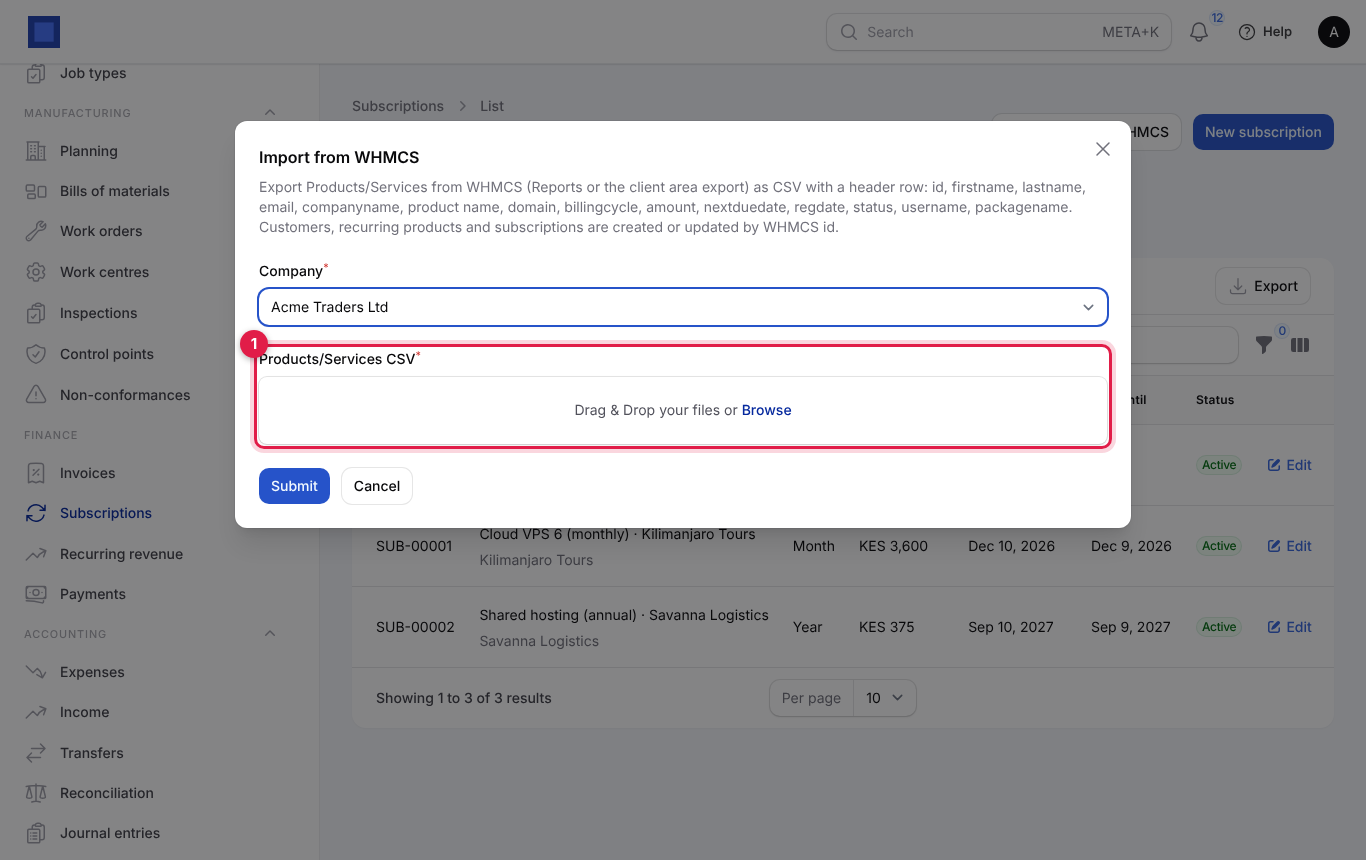
For each row, the customer is found by email or created, the plan is found by name or created as a recurring product, and the subscription is created or updated (matched on the WHMCS id, so you can import again safely). Billing cycles map to NaliSuite cycles (Semi-Annually becomes every 6 months, Biennially every 2 years); WHMCS statuses map as Active → Active, Suspended → Paused, Terminated/Cancelled/Fraud → Cancelled, Pending → Draft. The next due date becomes the next invoice date, and the domain, username and package fill the hosting fields. The message at the end says how many were created, updated and skipped, with the first errors (for example "Row 7: needs an email and a product name").
Tip: Import with automatic sending off in Preferences, check the next invoice dates, then switch it back on.
Track recurring revenue and churn
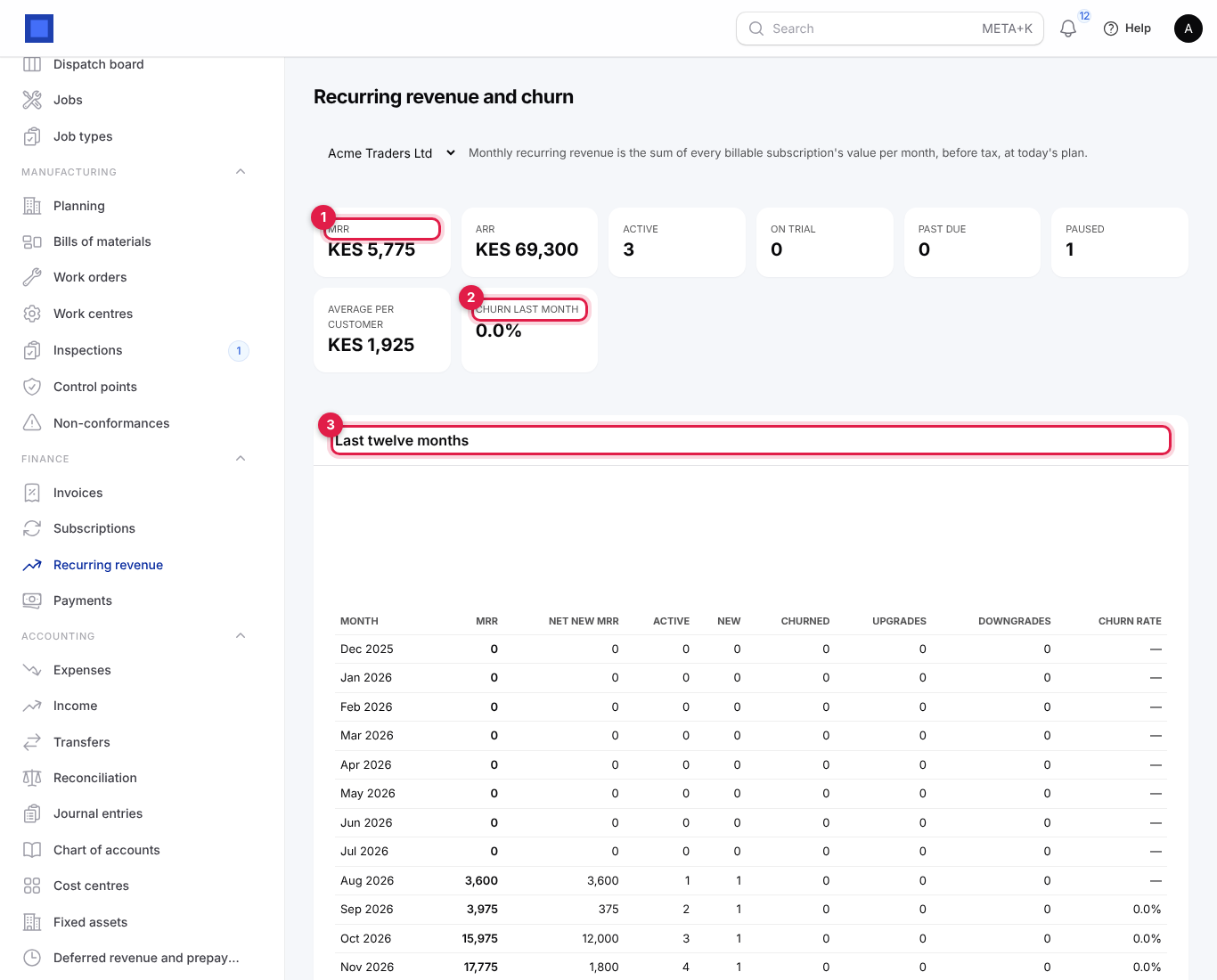
Finance → Recurring revenue shows how the subscription business is doing.
| Figure | Meaning |
|---|---|
| MRR (marker 1) | Monthly recurring revenue: every billable subscription's value per month, before tax, at today's plan. |
| ARR | MRR × 12. |
| Active, On trial, Past due, Paused | How many subscriptions are in each state. |
| Average per customer | MRR divided by the number of live subscriptions. |
| Churn last month (marker 2) | Subscriptions that ended last month as a percentage of those active at the start of the month. |
| Last twelve months (marker 3) | Month by month: MRR, Net new MRR, Active, New, Churned, Upgrades, Downgrades and Churn rate. |
Choose the company at the top when you have more than one.
Subscription preferences
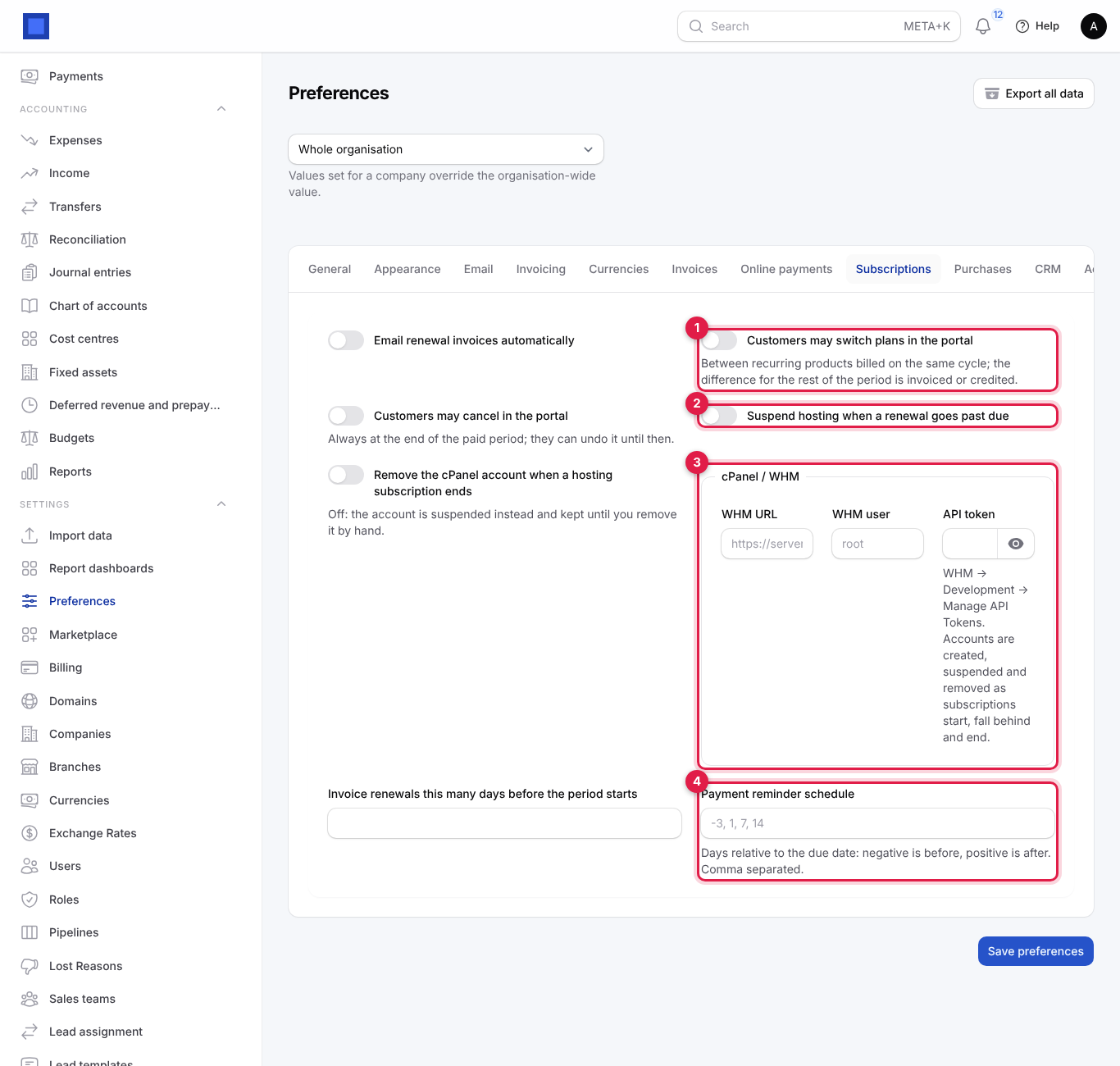
Settings → Preferences → Subscriptions:
| Setting | What it does |
|---|---|
| Email renewal invoices automatically | Master switch for emailing renewal invoices. |
| Customers may switch plans in the portal (marker 1) | Between recurring products billed on the same cycle; the difference is invoiced or credited. |
| Customers may cancel in the portal | Always at the end of the paid period; they can undo it until then. |
| Suspend hosting when a renewal goes past due (marker 2) | Suspends the cPanel account of a past-due hosting subscription. |
| Remove the cPanel account when a hosting subscription ends | Off: the account is suspended and kept until you remove it by hand. |
| cPanel / WHM (marker 3) | WHM URL, WHM user, API token. |
| Invoice renewals this many days before the period starts | Default for new subscriptions. |
| Payment reminder schedule (marker 4) | Days relative to the due date for reminder emails on every invoice, for example -3, 1, 7, 14. See Invoices and payments. |
Common questions
The first invoice was not created when I clicked Start. It is issued at the next nightly billing run unless the start date has already passed. Use Invoice now to bill at once.
Can I change the price of a running subscription? Use Change plan to move it to another product, or edit the line's Price on the subscription; the new price applies from the next renewal.
Why can't I change Billed every? The cycle is locked once a subscription starts. Cancel it at period end and start a new one, or change plan.
A customer paid but the subscription still says Past due. It returns to Active at its next renewal billing. Hosting is unsuspended then; use Unsuspend hosting to do it now.
Customers cannot see their subscriptions in the portal. Switch on Preferences → Customer portal → Show subscriptions to customers.
Hosting status shows an error. The last WHM error is shown under cPanel username. Check the WHM URL and token, then use Provision hosting again.