Restaurant Pro
Restaurant Pro is for restaurants, cafés, hotels' kitchens, nyama choma joints, bars and canteens that sell at the till. It builds on the point of sale's restaurant mode (tables, open tabs, the kitchen screen and split bills, see Point of sale) and adds what the kitchen needs: a recipe for every dish so its ingredients leave stock as it sells, the plate cost and food-cost percentage of each dish, a waste log, menu engineering to see which dishes earn their place, and table bookings. Everything is in the Point of Sale group of the left menu: Recipes, Table bookings, Waste log and Menu engineering.
Switch Restaurant Pro on
Restaurant Pro is an add-on sold separately from your plan. It needs the Point of Sale and Inventory apps; switching it on switches those on too.
- Open Settings → Marketplace and search for Restaurant, or click Industry solutions.
- On the Restaurant Pro card, click Start free trial (or Add to subscription) and confirm. The four pages appear under Point of Sale.
- To stop, click End trial or Cancel on the card. Recipes, bookings and the waste log are kept, but ingredients stop leaving stock with each sale.
If the card says Not available for purchase yet, ask NaliSuite support to switch it on. See Billing and marketplace.
Permissions (under Settings → Roles):
| Permission | What it allows |
|---|---|
| restaurant.view | See recipes with their costs, table bookings, the waste log and menu engineering. Waiters and hosts need this. |
| restaurant.manage | Add and change recipes, take, seat, cancel and mark table bookings, and log waste. |
Owners and admins have both; the member role has restaurant.view. Selling at the till itself needs the point of sale permissions.
Settings that matter
Restaurant Pro has no tab of its own. Set these first:
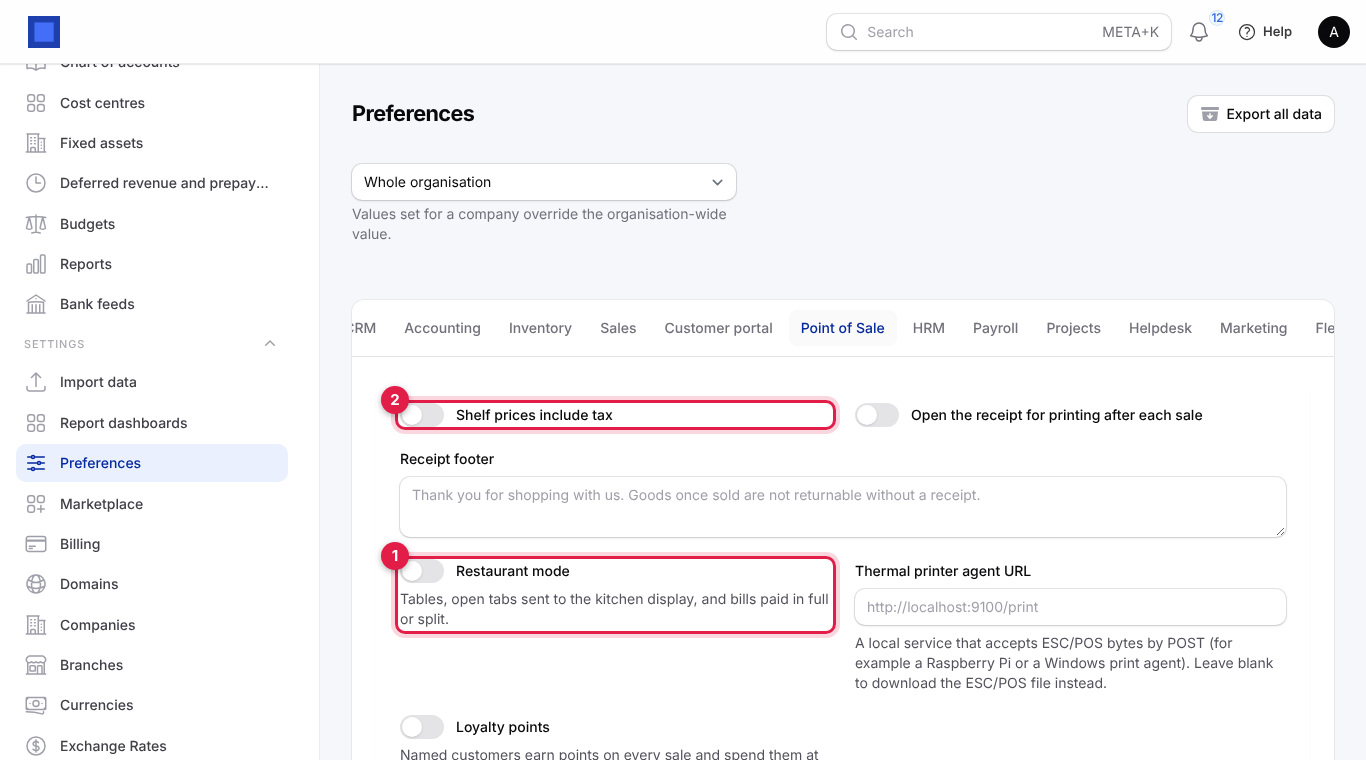
- Open Settings → Preferences and click the Point of Sale tab.
- Turn on Restaurant mode (marker 1) for tables, open tabs, the kitchen display and split bills.
- Check Shelf prices include tax (marker 2): on when your menu prices include VAT (the usual case in a restaurant).
- Click Save preferences (marker 3).
| Setting | Where | Effect on Restaurant Pro |
|---|---|---|
| Restaurant mode (marker 1) | Point of Sale tab | Tables and tabs at the till. Table bookings use the same tables (Point of Sale → Tables). |
| Shelf prices include tax (marker 2) | Point of Sale tab | Whether menu prices include VAT. Menu engineering uses the price before tax. |
| Allow stock to go negative | Inventory tab | Off (the default): a sale is refused when an ingredient is short (see below). On: the sale goes through and the ingredient goes below zero until you receive more. |
| The register's warehouse | Point of Sale → Registers | Ingredients leave the store the register sells from; the default warehouse when the register has none. |
Ingredients are ordinary stocked products. Create them under Sales → Products as Goods with Track inventory on, the right unit (kg, litre, bunch, pc) and a Cost price, and receive them into stock with purchase orders or bills (see Inventory). Dishes are products you sell at the till, usually services or goods that do not track inventory.
1. Write a recipe for each dish
- Open Point of Sale → Recipes. Each dish shows how many Ingredients it has, its Menu price (marker 2), its Plate cost (marker 3: what the ingredients of one portion cost) and its Food cost (marker 4: plate cost as a share of the menu price; green up to 35%, red above).
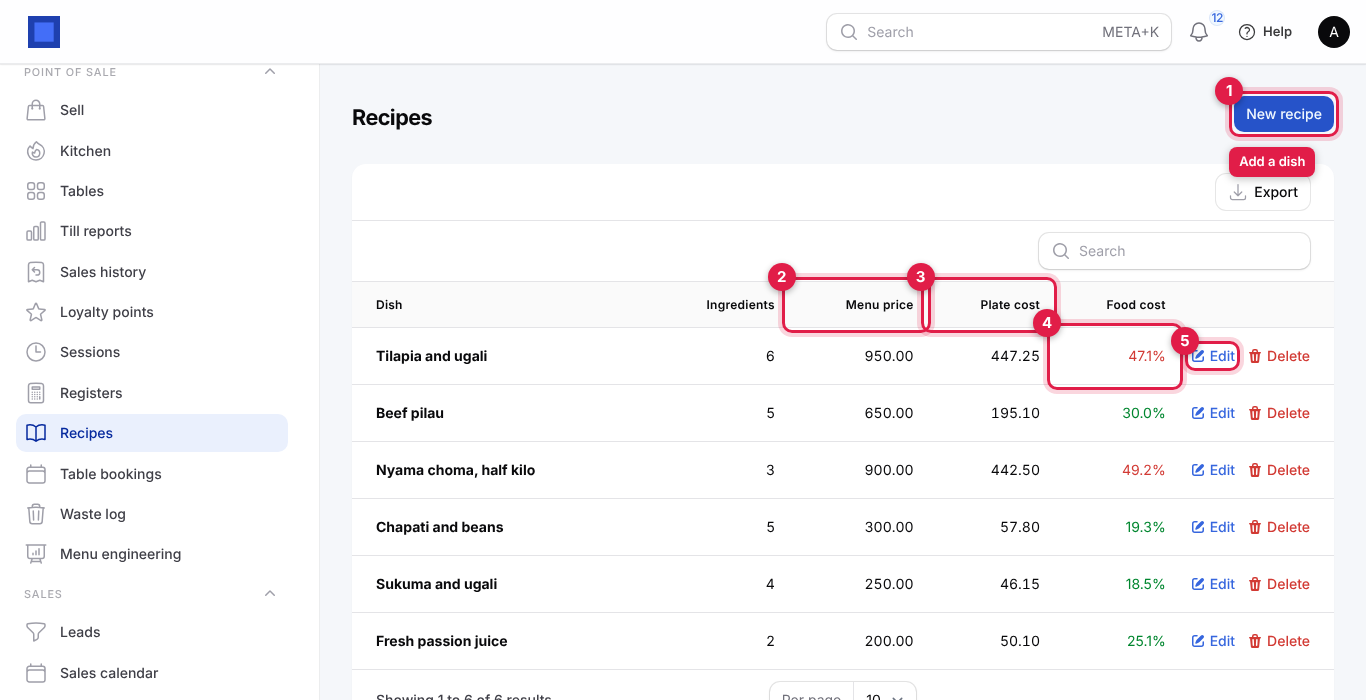
- Click New recipe (marker 1), or Edit (marker 5) to change one.
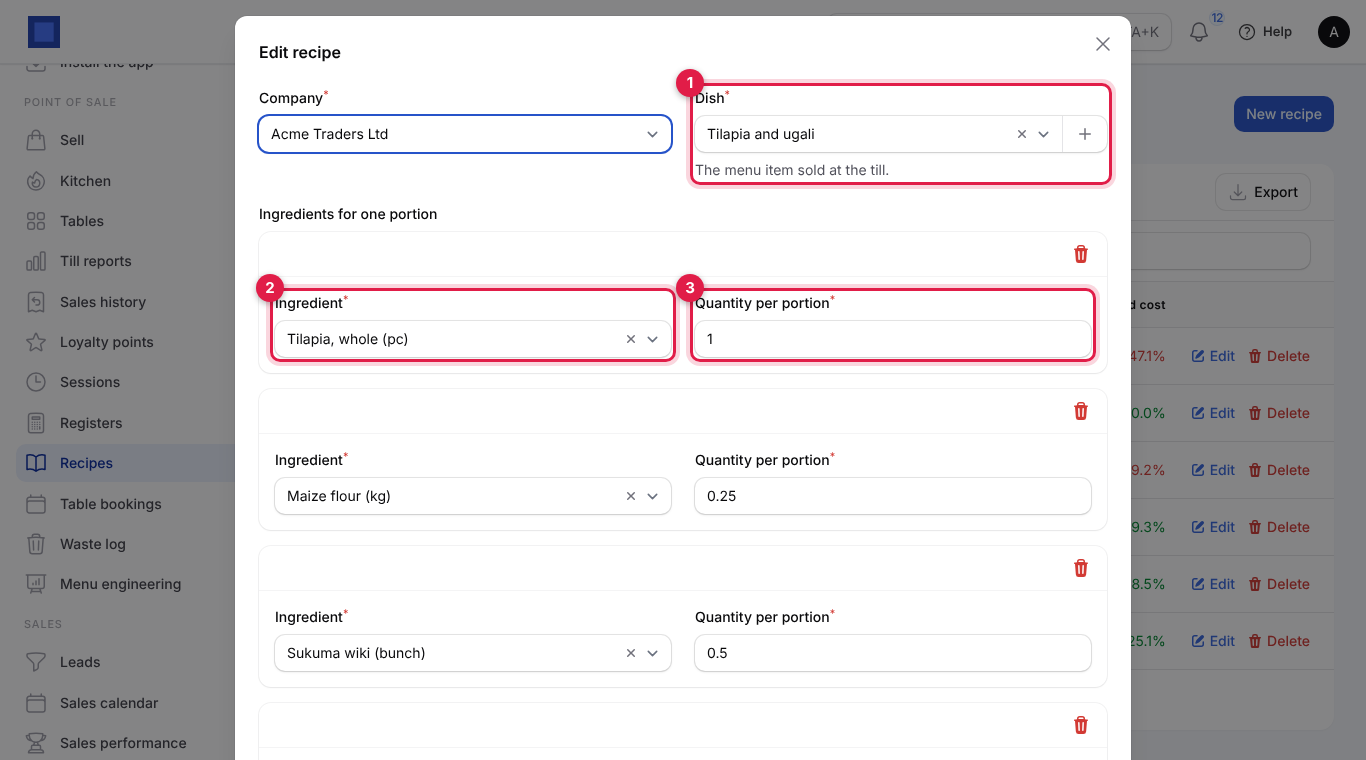
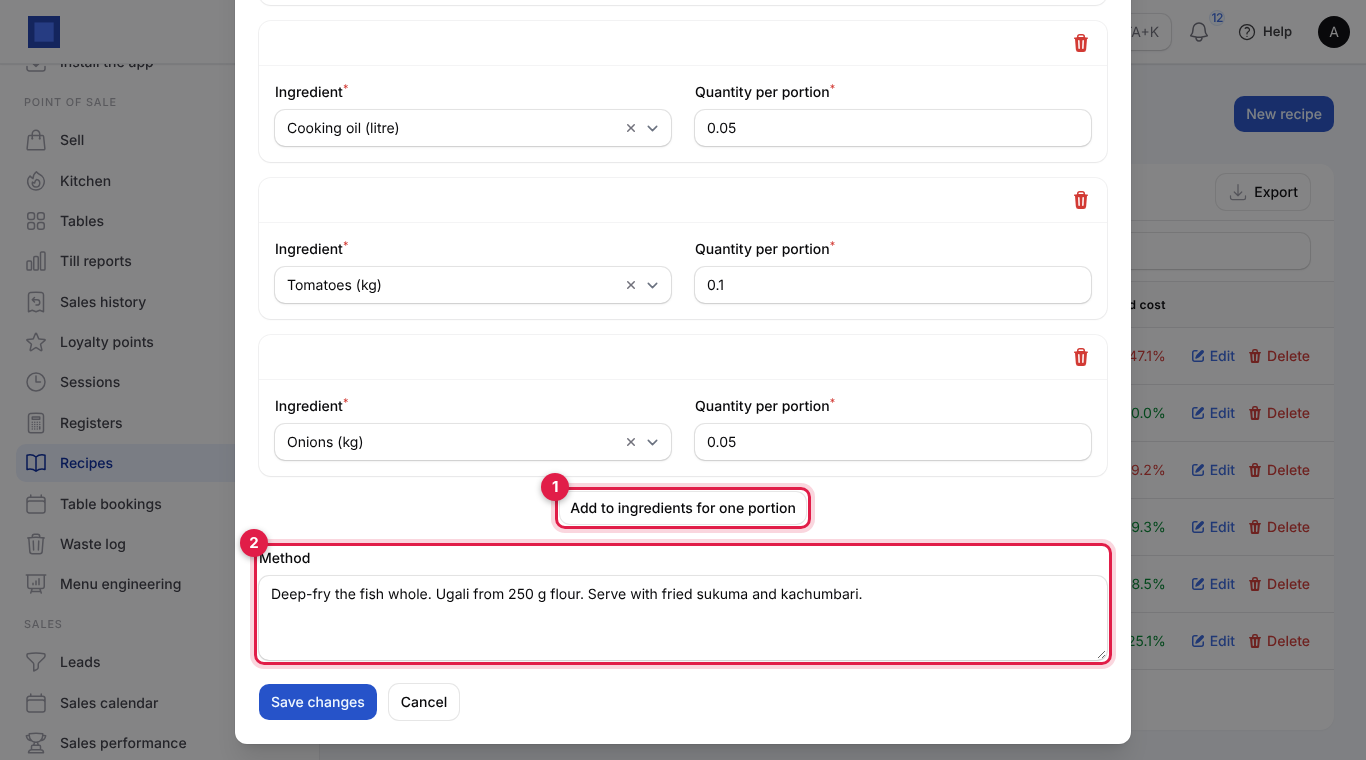
| Field | What to enter |
|---|---|
| Company (required) | Starts on your default company. |
| Dish (required, marker 1) | The menu item sold at the till, for example Tilapia and ugali. Each dish has one recipe. |
| Ingredient (required, marker 2) | A stocked item, shown with its unit, for example Maize flour (kg). |
| Quantity per portion (required, marker 3) | How much of it one plate uses, in the ingredient's unit: 0.25 kg of maize flour, 1 fish, 0.5 bunch of sukuma. |
| Add to ingredients for one portion (second screenshot, marker 1) | Adds another ingredient line. The bin icon removes one. |
| Method (marker 2) | Optional notes for the cooks: Deep-fry the fish whole. Ugali from 250 g flour. |
- Click Create (or Save changes). Delete removes a recipe; the dish then stops taking ingredients out of stock.
How the plate cost is worked out: for each ingredient, quantity per portion × its average cost in stock (or its Cost price when none is in stock), added up. Tilapia and ugali: 1 fish × 380 + 0.25 kg flour × 75 + 0.5 bunch sukuma × 30 + 0.05 litre oil × 320 + 0.1 kg tomatoes × 120 + 0.05 kg onions × 110 = 447.25. At a menu price of 950 that is a food cost of 47.1%, in red: raise the price, shrink the portion or buy cheaper fish.
Tip: Most restaurants aim for a food cost between 28% and 35%. Weigh portions once in the kitchen and use those weights in the recipe; guessing makes every number on this page wrong.
2. Ingredients leave stock as dishes sell
You do nothing extra at the till. When a sale is rung up:
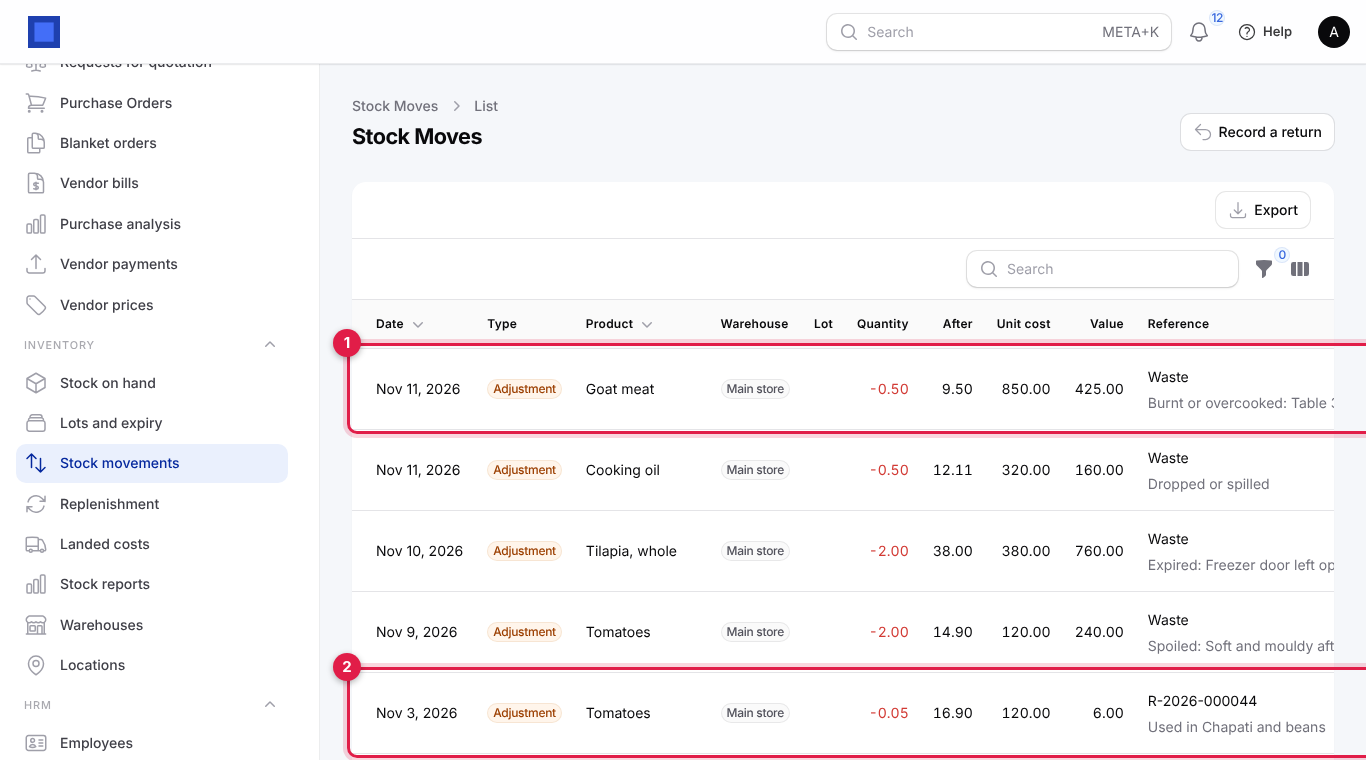
- for every dish with a recipe, each tracked ingredient is taken out of the register's store: quantity per portion × plates sold, as a stock adjustment noted Used in Tilapia and ugali with the receipt number;
- a refund at the till puts the ingredients back (Returned with …);
- dishes on an invoice (catering, events, room service charged to a hotel room, a sale on account raised from an order) take their ingredients from your default store when the invoice is issued, and a credit note puts them back. Proforma invoices do not move stock.
Open Inventory → Stock movements to see it: waste (marker 1) and ingredients used by a dish (marker 2), each with the quantity and its value.
Note: With Allow stock to go negative off, a sale is refused when the store does not hold enough of an ingredient, with a message such as Only 0.2 kg of Maize flour in Main store. Receive the stock (or correct the count) and ring the sale up again. Keep your ingredient stock up to date, or turn on negative stock if the kitchen buys from the market and records purchases later.
Ingredients that do not track inventory are counted in the plate cost but never leave stock.
3. Log waste
Record everything thrown away so your stock and your food cost stay true.
- Open Point of Sale → Waste log (titled Waste Entries). Each entry shows the date, the item, the quantity with its unit, the Reason (marker 2), notes and the Cost (marker 3). The Total under the list (marker 4) adds up the cost of what is shown; use the filter icon to filter by reason.
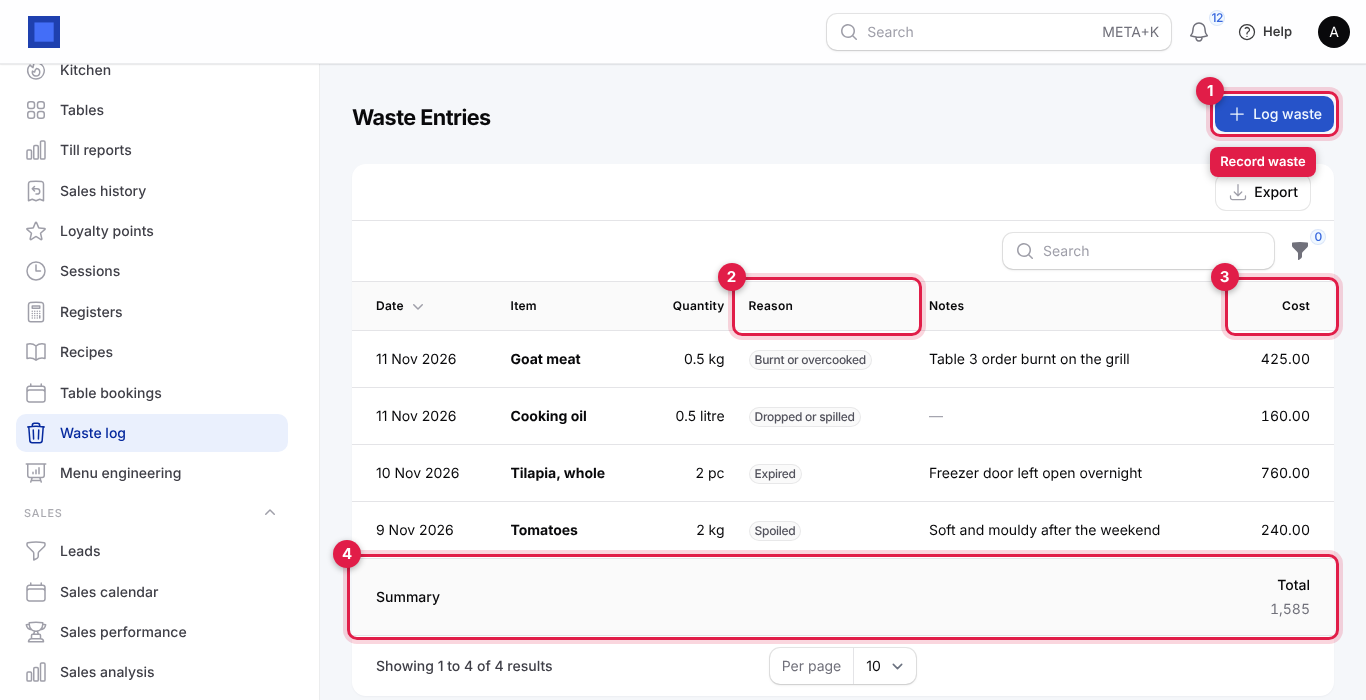
- Click Log waste (marker 1).
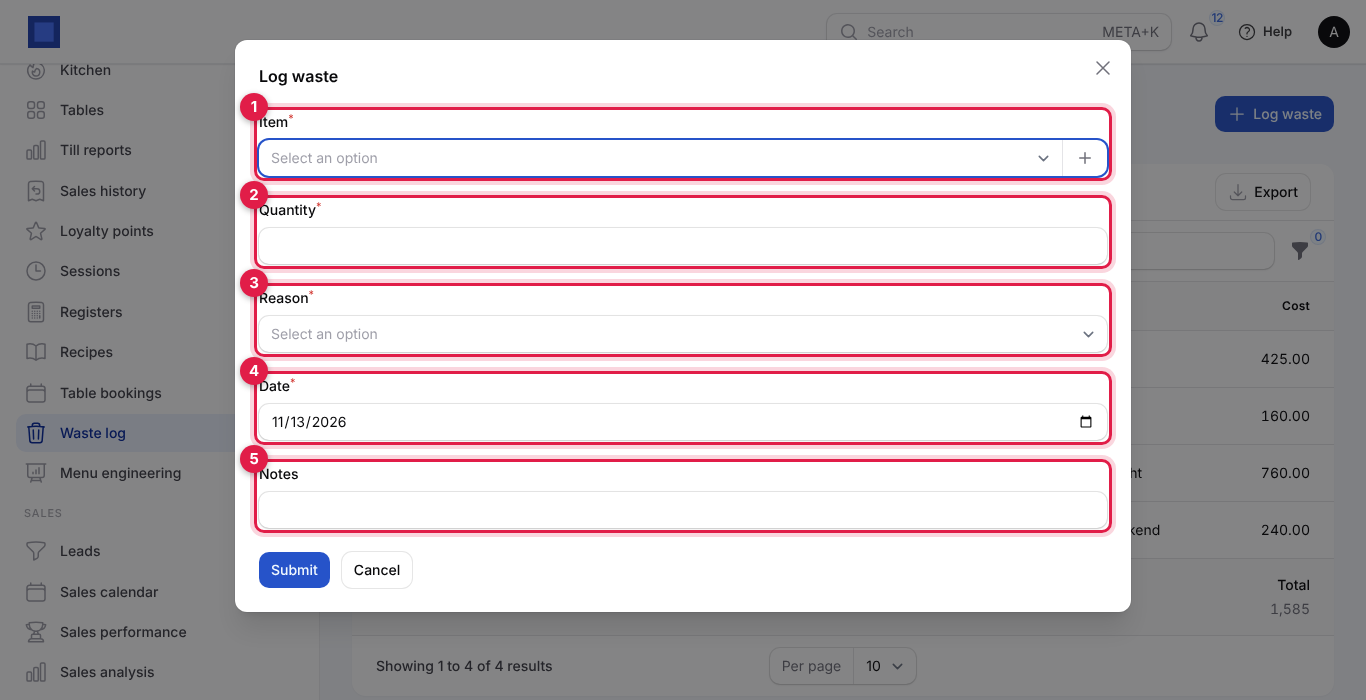
| Field | What to enter |
|---|---|
| Item (required, marker 1) | Any goods item, shown with its unit. |
| Quantity (required, marker 2) | How much, in the item's unit. |
| Reason (required, marker 3) | Expired, Spoiled, Dropped or spilled, Burnt or overcooked, Sent back or Other. |
| Date (required, marker 4) | Today or earlier. |
| Notes (marker 5) | Freezer door left open overnight. |
- Click Submit. You see Logged. Cost 760.00. The cost is the quantity × the item's average stock cost (or cost price). If the item tracks inventory, it leaves your default store as a stock adjustment noted Waste.
Waste entries cannot be edited or deleted; log a correcting entry the other way in Inventory if you made a mistake.
4. Menu engineering
Open Point of Sale → Menu engineering to see which dishes deserve their place on the menu. Pick the period with From (marker 1) and To (marker 2); it opens on the last 30 days.
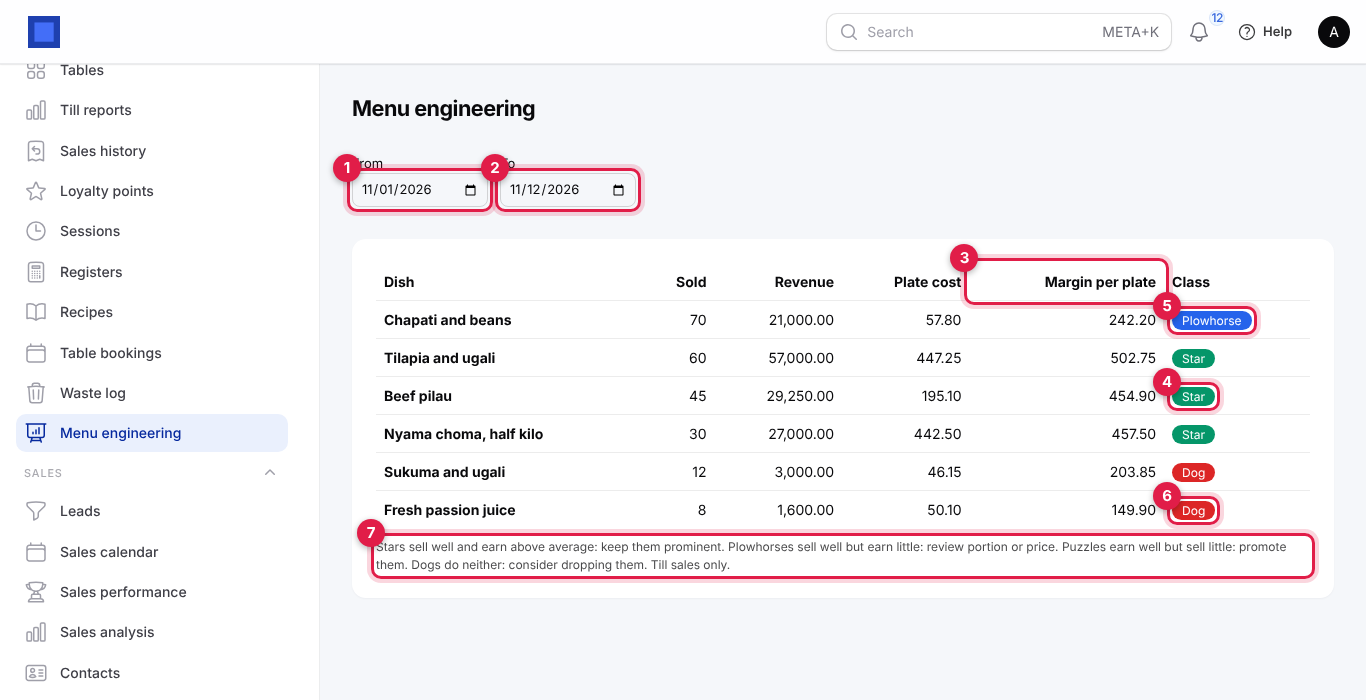
For every dish with a recipe, the table shows how many were Sold at the till in the period, the Revenue (before tax), the Plate cost, the Margin per plate (marker 3: average selling price before tax less plate cost) and its Class:
| Class | Meaning | What to do |
|---|---|---|
| Star (marker 4) | Sells well and earns above-average margin. | Keep it prominent; do not touch the recipe. |
| Plowhorse (marker 5) | Sells well but earns little. | Review the portion or the price. |
| Puzzle | Earns well but sells little. | Promote it: waiters suggest it, put it on the board. |
| Dog (marker 6) | Neither. | Consider dropping it. |
A dish counts as popular when it sold at least 70% of the average number of plates per dish. The margin is compared with the average margin across all plates sold. Dishes are listed with the best sellers first. The note under the table (marker 7) repeats the advice. Only till sales count; dishes sold on invoices are not included.
5. Table bookings
- Open Point of Sale → Table bookings (titled Table Bookings). Each booking shows When, the name and phone, Guests, the Table (marker 2), Notes (marker 3) and the Status, soonest first. The list opens with the Today and later filter (marker 4); click × on the chip to see older bookings too. Search by name with the search box.
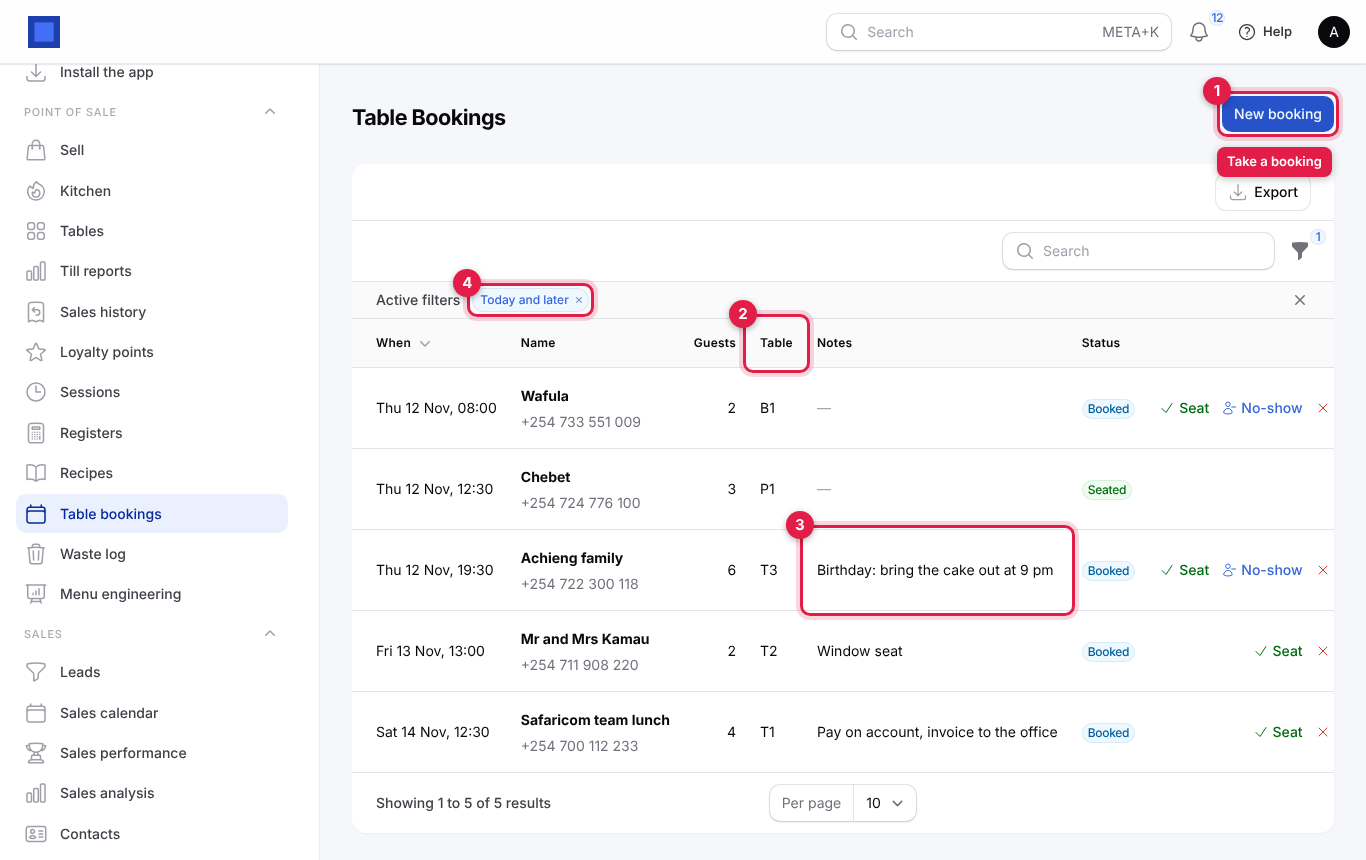
- Click New booking (marker 1).
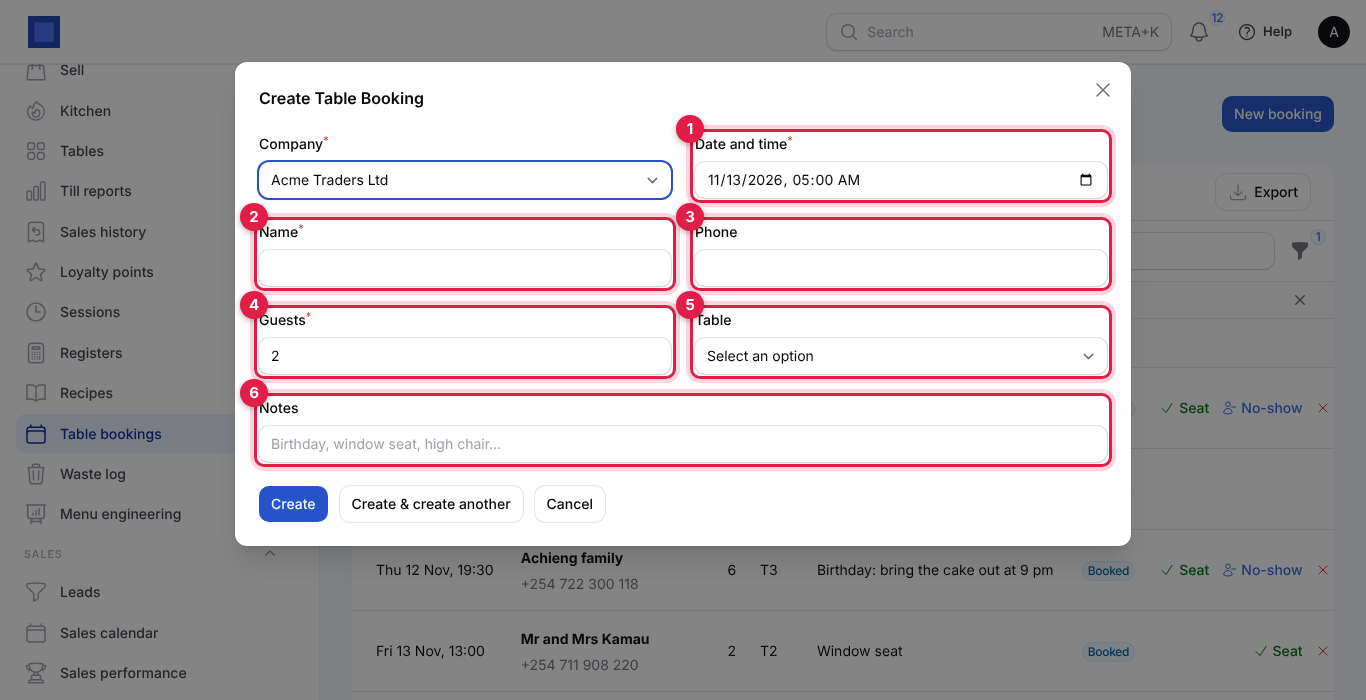
| Field | What to enter |
|---|---|
| Company (required) | Starts on your default company. |
| Date and time (required, marker 1) | Starts on the next full hour. |
| Name (required, marker 2) | Achieng family. |
| Phone (marker 3) | To call if they are late. |
| Guests (required, marker 4) | 1 to 200. Default 2. |
| Table (marker 5) | Optional. Your active tables with their seats, for example T3 · 6 seats. Tables are set up under Point of Sale → Tables. |
| Notes (marker 6) | Birthday: bring the cake out at 9 pm, window seat, high chair. |
- Click Create.
The buttons on each booking (scroll the list sideways on a small screen to see them):
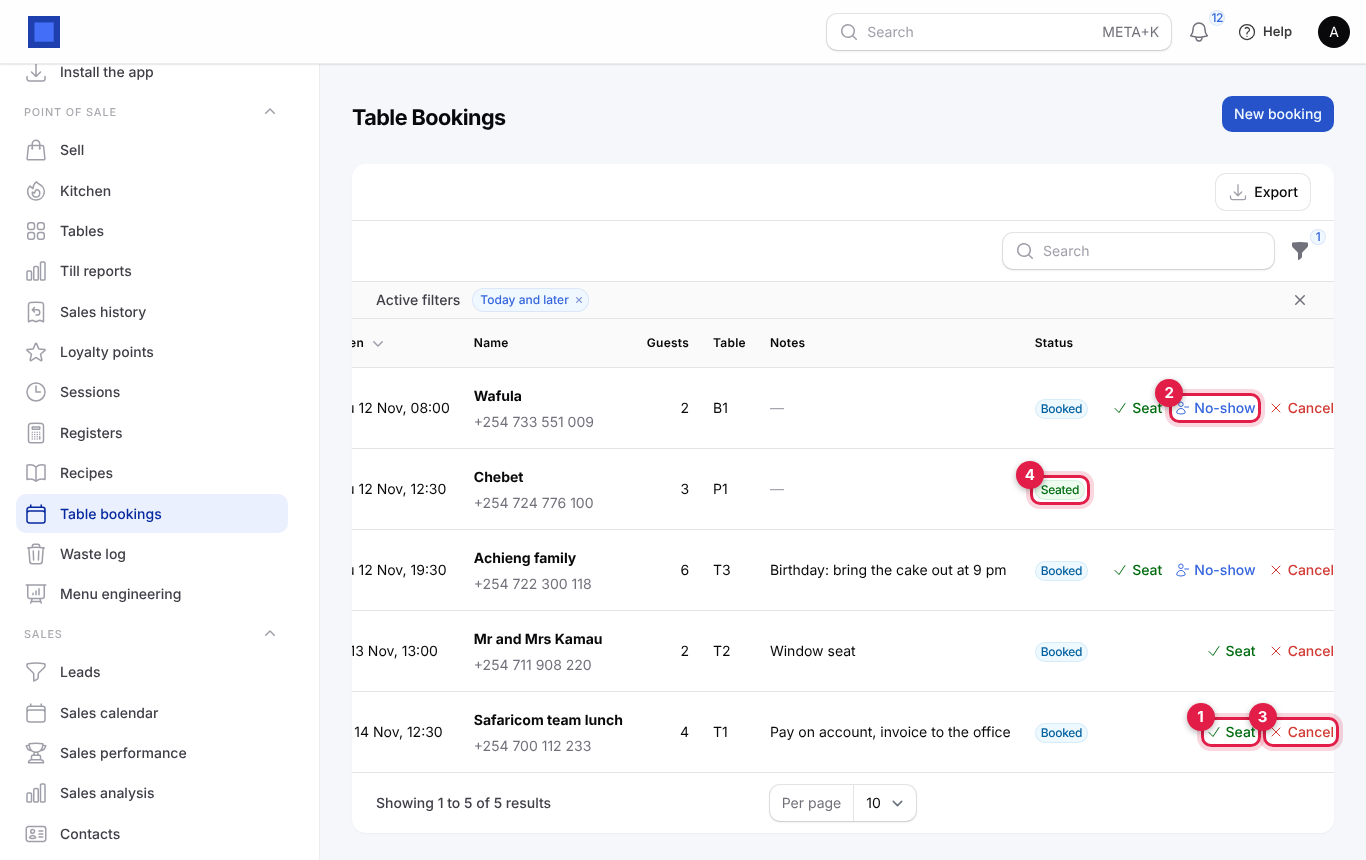
| Button | When | What it does |
|---|---|---|
| Seat (marker 1) | Booked | The party has arrived: the booking becomes Seated (marker 4). Open their tab at the till as usual. |
| No-show (marker 2) | Booked, once the booking time has passed | Marks the booking No-show. |
| Cancel (marker 3) | Booked | Asks you to confirm, then marks it Cancelled. |
| Edit | Always | Change the time, table, party or notes. |
Once a booking is seated, cancelled or a no-show, only Edit is left.
| Status | Meaning |
|---|---|
| Booked | Expected. |
| Seated | Arrived and seated. |
| Cancelled | Will not come. |
| No-show | Did not come. |
Bookings do not block tables at the till and are not checked against each other: look down the list before you promise a table. No message is sent to the guest.
Common questions
Why did a till sale fail with "Only … in Main store"? An ingredient of one of the dishes is short in the register's store. Receive the stock, or turn on Allow stock to go negative in Inventory's preferences.
The plate cost looks wrong. Check the units: a recipe that says 250 for maize flour in kg means 250 kg. Then check the ingredient's cost: the average cost of what is in stock is used, or the product's Cost price when there is none.
Can a recipe use another recipe (a sauce or a stock)? No. List the raw ingredients of the sauce in each dish, in the share one portion uses.
Does a dish on a hotel room bill take ingredients? Yes. When a dish with a recipe is charged to a room as a product, its ingredients leave your default store when the bill is issued at check-out (see Hotel and Guest House).
Why is my best seller missing from menu engineering? Only dishes with a recipe are analysed. Add one.
Do drinks need recipes? Bottled drinks sold as stocked goods leave stock by themselves. Give recipes to things you make: juices, cocktails, tea.